AppImages
An overview about AppImages. What are they, why are they and why do they have such a vivid reputation amongst the Linux community.
If you are around the Linux world for some time you may have already heart about AppImages. In case you didn't or simply want to know more about them you came to the right place. During this blog post I'll also answer why they have a mixed reputation among Linux users.
Linux distributions usually ship every single software themselves in their own repositories. As an end user chances are good you find what you seek if you run one of teh bigger ones or one which is based on something popular. Therefore, you can simply search and download them through the software manager or via commandline.
Nonetheless not every software is available for any distribution or maybe it is lacking the latest or a particular version. In this case users begin to search for XYZ application for ABC distribution in order to install a more recent version. Sometimes they are lucky and someone ships a community package which allows you to update the software in question. Usually this is done via 3rd party repositories.
But be aware installing "community provided" packages might not sound like an issue but in reality you simply trust a stranger not to ship malware or hope they packaged and tested it right and it does not cause any trouble later down the road. Also it may have to update some system libraries as well which then might conflict with others things on your system.
This is a lot of stuff which can go wrong and at time might be hard to manage. Soon the question comes up what to do. Switching the distribution of choice which offers a little more recent software stack? What if there are other things missing which are currently working fine?
AppImages aim to solve these very issues.
What is an AppImages?
The main idea about AppImages is that the original developer packages and ships the software exactly once and that it runs on any Linux Distribution without modifications. As well as freeing the developers from dealing with different packaging pipelines for different distributions. While also not be required to trust a 3rd party to ship the software for them.
But this is not all, AppImage also try to be contained in one singular executable file which contains everything needed so it runs on the target system which makes them very portable too. Simply download and run. No matter when or if in an online or offline environment.
FUSE (Filesystem in Userspace)
To achieve most of it's goals AppImage make use of FUSE (File System in Userspace). What this means is they create a virtual filesystem which is independent from the hos system and runs the software within it. Therefore it creates a temporary file system which contains all the required libraries and other components for the app to run. Without needing to shadow the hosts files ore requiring to modify system libraries.
The downside of this is, they are often times much larger and contain more then just the application itself as it has to ship all it's dependencies themselves. If you're using many AppImages there will be some redundance as most of them require similar or maybe even the same dependencies but include them all individually. As AppImages obviously do not share their dependencies, otherwise they wouldn't be portable.
Dependency Hell
While on paper AppImage include all they need they still do not ship everything. If you for example look at any Live Image of any Linux Distribution you may notice they are often several hundreds MiB and sometimes even GiB in size. AppImages are noticeably smaller.
Agreed they do not have to ship a full desktop environment or the Linux kernel and also they include only one app and not hundred. But still they assume certain dependencies to be available on the host system. This is where the "dependency hell" begins.
One essential thing required on the host is libfuse2 as well as some libraries for user interfaces such as the X11 server and stuff required for it. Also it may be very much possible the original author simply missed to include some stuff. This might be because teh distribution they tested the AppImage on had some additional libraries installed not commonly found and thus was not aware they are essential.
All this sums up to a barely manageable minefield while they are affected by another issue as well.
Once packaged up and provided for download they will float around the internet for years to come. This means while some libraries might be commonly included in distributions as the Image was new some of these might have vanished overtime. Like the X11 server which is slowly phased out. Or they are simply reliant on old libraries with known security issues. This forces end users to install old stuff for compatibility reasons. One prominent example is libfuse2 itself. The latest and final release was January 4 2019 ...
Run AppImages using Distrobox
If you are seeking for a more or less secure environment to run aging AppImages with I'd like to recommend Distrobox. This way you can run a disposable Linux system within your main one to execute AppImages and install all those pesky dependencies in. Without risking the integrity of you main distribution. I even once created an Distrobox Assemble Script to do exactly this. It should pre-install most commonly used AppImage dependencies while also keeping your actual system clean.
You can run the script using distrobox-assemble create –file /pfad/zur/ini/datei/distrobox.ini and it should create a new AppImage container. Launching the container for the ist time might take a while as distrobox needs to setup things first. Once this is done it will launch much faster.
Dolphin Service menu
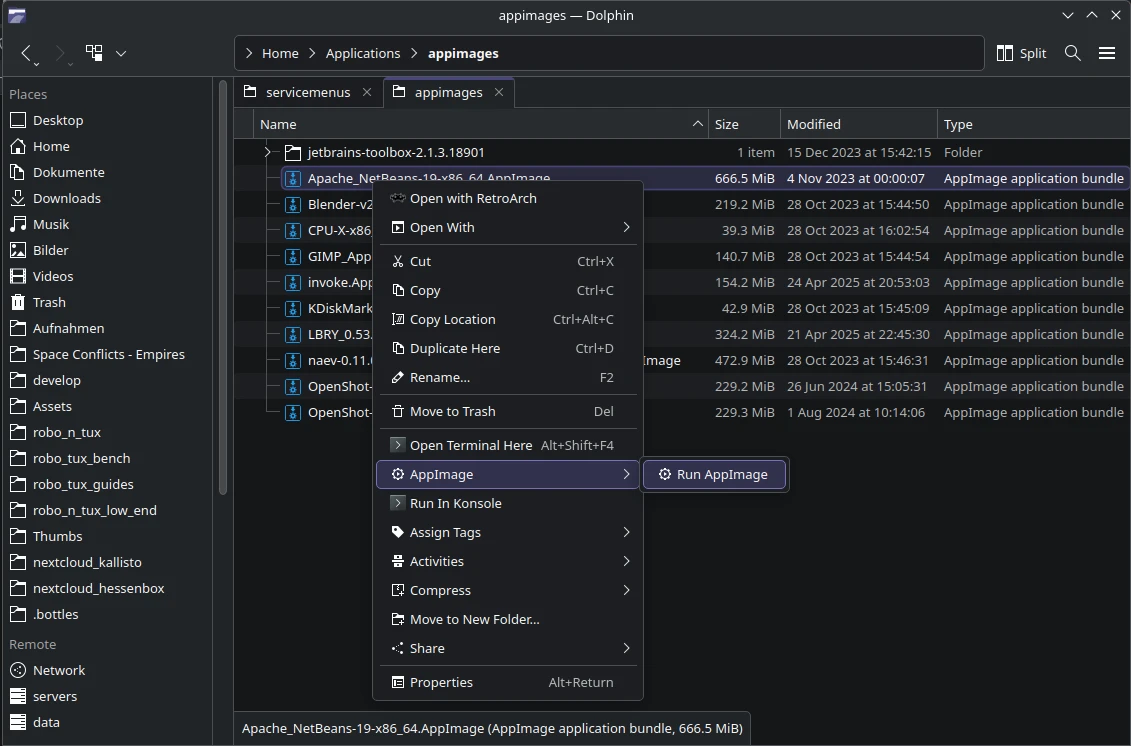
If you are running a KDE based Linux system you may want to make use of my KDE service menu which allows you to right click any AppImage and run it withing the container.
Simply place it at ~/.local/share/kio/servicemenus/ and create the directory if it is missing. Next mark the appimage.desktop as executable. Right-Click -> Properties -> Permissions -> Mark as executable.
Afterwards there should be a new menu entry while righ-clikcing any file which reads AppImage -> Run AppImage right in side Dolphin.
Nautilus Script
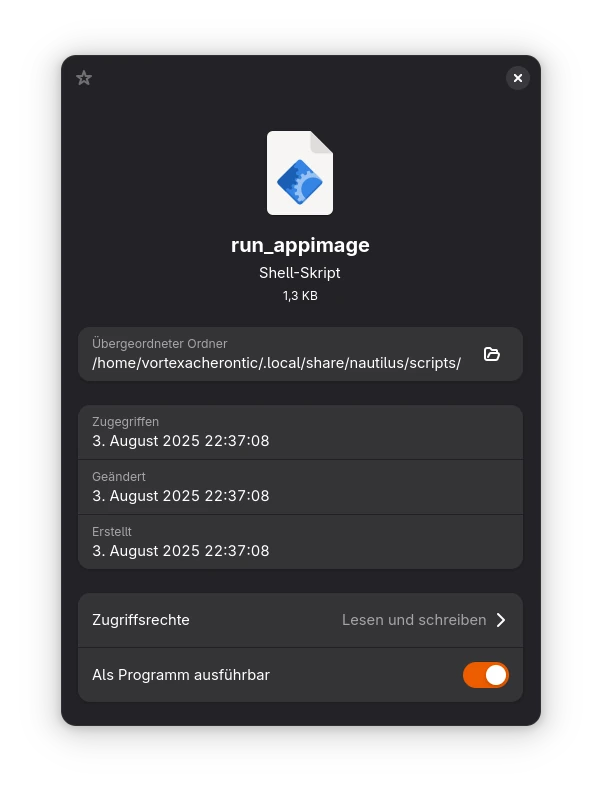
For users of the Gnome Destop environem I als wrote a little helper script for Nautilus which does the same thing. Download it from here and save it at ~/.local/share/nautilus/scripts/. If this directory does not exists create it. Then you have to mark the file as executable right-click -> Properties -> Mark as executable
Desktop integration
If you are already familiar with AppImages you may know about it's desktop integration feature. This means AppImages will create a luncher in your app menu so you can easily access them from there.
This does not work with my suggested solution and it is very difficult to adapt teh existing ways of achieving this as these assume AppImages are ran natively using libfuse2 on the host. Not from within a distrobox container.
If you wish for this feature you may have to create these launchers yourself.
Summary
In theory AppImages are actually a very good idea but unfortunately they do not live up to their promise. Not just because they do not include all their dependencies and force users to install out-date libraries they oppose other challenges as well.
To validate the legitimacy of an AppImage would require to the end user to manually validate their signatures while the original developers have to make their public keys available somewhere for users to download. Something which is done implicitly on any other way of installing software on Linux through your package manager.
Therefore be extra careful if you download AppImages and plan on using them.